Managing firewall rules is a crucial security task on Linux systems. In Debian 13, depending on the server configuration, different firewall tools can be installed. The most common are UFW, iptables, or firewalld. You must first check if your firewall is active and what rules are in place. Also, make sure that network ports are open or blocked.
This guide will explain how to check the firewall status in Debian 13, with each step explained clearly before you run any commands.
Table of Contents
How to Check Firewall Status on Debian 13
Once you know which firewall tool is used by your system, it’s easy to check the status of the firewall on Debian 13. Whether you use UFW, iptables, or firewalld on your server, all three methods provide a clear way to view firewall activity, confirm security configuration, and inspect firewall activity. You can verify the firewall status safely by following the instructions before each command. This will prevent you from accidentally changing your system. By keeping track of the firewall status, you can ensure that your Debian VPS is secure, protected, and configured correctly.
Method 1: Check Firewall Status Using UFW (Uncomplicated Firewall)
UFW is the firewall that comes as standard on most Debian-based servers.
Step 1: Check if UFW is installed
It is important to confirm that UFW is installed on your computer. If the command below returns a number, then UFW is already installed.
ufw –version |
|---|


Step 2: Check UFW status
The firewall status is shown, along with the list of rules that are enabled.
sudo ufw status verbose |
|---|


You can see information like the number of ports allowed, ports denied, the level of logging, and default policies.
Step 3: Check whether the UFW service is running
Use systemd in order to check that the UFW Daemon is enabled and active on boot.
systemctl status ufw |
|---|

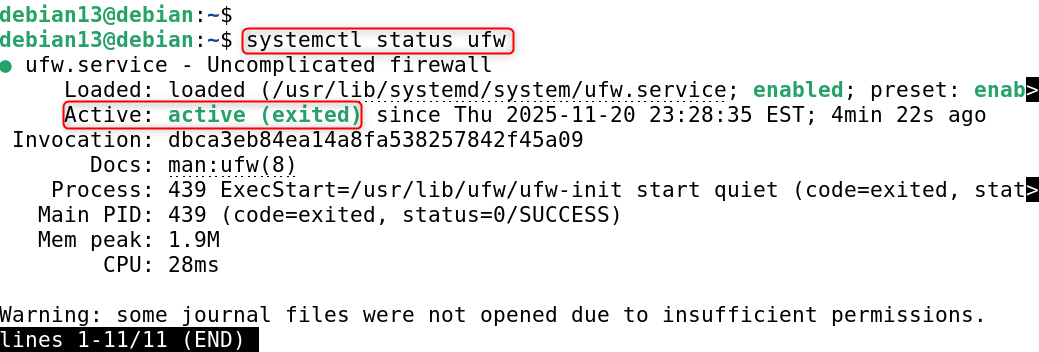
You can see if UFW has been active, inactive, or stopped.
Method 2: Check Firewall Status Using iptables
Some VPS providers and older Debian configurations still use iptables as the packet filtering system.
Step 1: Check if iptables is available
This will confirm that iptables has been installed on your computer.
iptables –version |
|---|


Step 2: List active iptables rules
This will display all firewall rules currently in use, including chains such as INPUT, OUTPUT, and FORWARD.
sudo iptables -L -n -v |
|---|

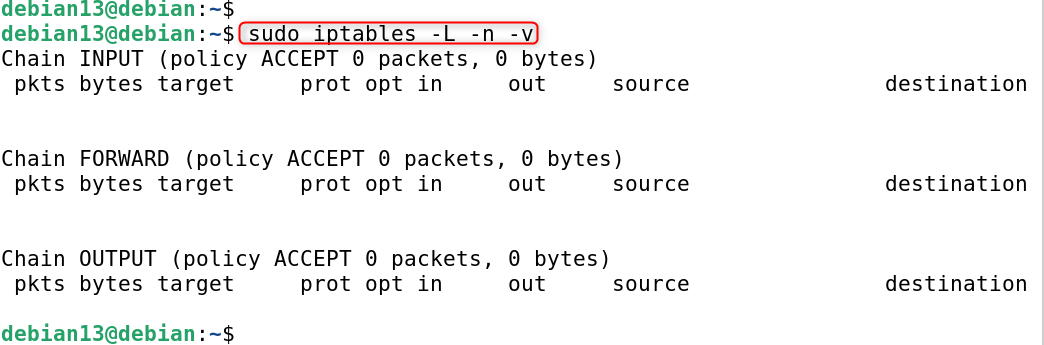
What it shows:
- -L → lists all rules
- -n → shows raw IPs instead of DNS names
- -v → verbose output
Step 3: Check iptables for specific ports
This will show you if the port is blocked or allowed.
sudo iptables -L INPUT -n | grep 22 |
|---|


Method 3: Check Firewall Status Using firewalld
Firewalls are used by some Debian systems, particularly when they have been manually installed or imported from Red Hat-based setups.
Step 1: Check if firewalld is installed
This will tell you if firewalld is installed on your Debian 13 System.
firewall-cmd –version |
|---|


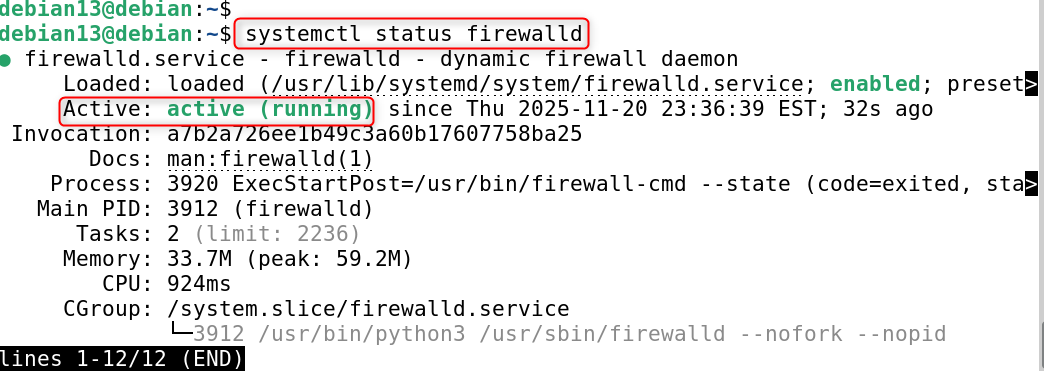
Step 2: Check the firewalld service status
This will show if firewalld has been enabled, stopped, or is active.
systemctl status firewalld |
|---|

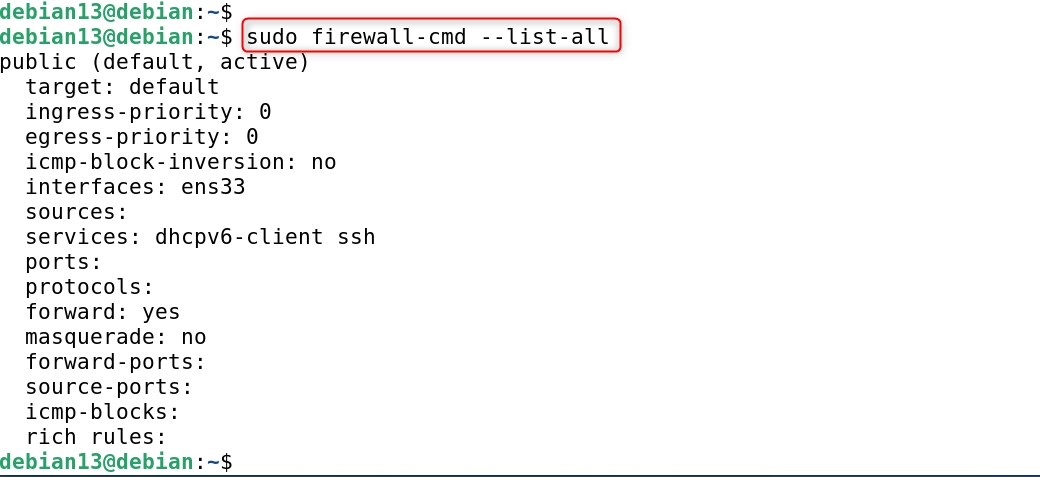
Step 3: Show the currently active firewall rules
This command displays all services, zones, ports, and allowed services configured in firewalld.
sudo firewall-cmd –list-all |
|---|

Step 4: Check all open ports in firewalld
You can quickly identify which ports on the network are permitted.
sudo firewall-cmd –list-ports |
|---|


Method 4: Check All Active Listening Ports (General Firewall Check)
You can check which ports are still open even if you don’t have a firewall installed.
Step 1: Show all listening network ports
You can then determine which services need firewall protection.
sudo ss -tulnp |
|---|

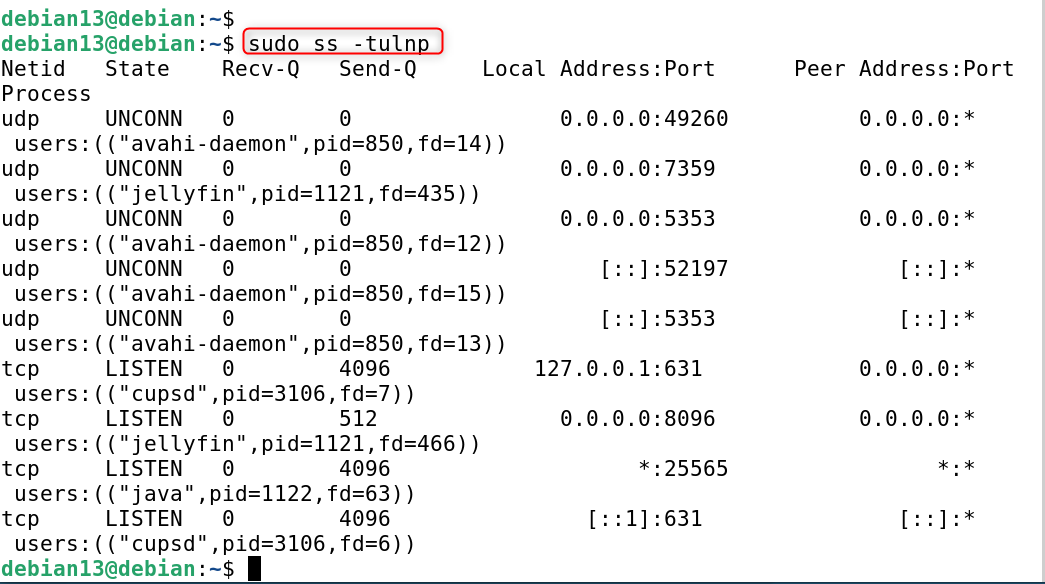
What it shows:
- t → TCP connections
- u → UDP connections
- l → listening ports
- n → show numeric addresses
- p → show process name
Method 5: Check for Active Firewall Services on Debian
This tool helps you detect if any firewalls are automatically enabled. List all firewall-related services.
This will give you a quick look at the firewall software that is installed.
systemctl list-units | grep -E “ufw|firewalld|iptables” |
|---|


Conclusion
To check the firewall status on Debian 13, first verify whether UFW, iptables, or firewalld is being used by your system; you can check UFW with sudo ufw status verbose to see if it’s active and what rules are enabled, check iptables rules using sudo iptables -L -n -v to view packet filtering chains, or check firewalld by running systemctl status firewalld followed by sudo firewall-cmd –list-all to view active zones and allowed ports, and if you’re unsure which firewall is running, use systemctl list-units | grep -E “ufw|firewalld|iptables” to identify the active firewall service.